
Verify a certificate
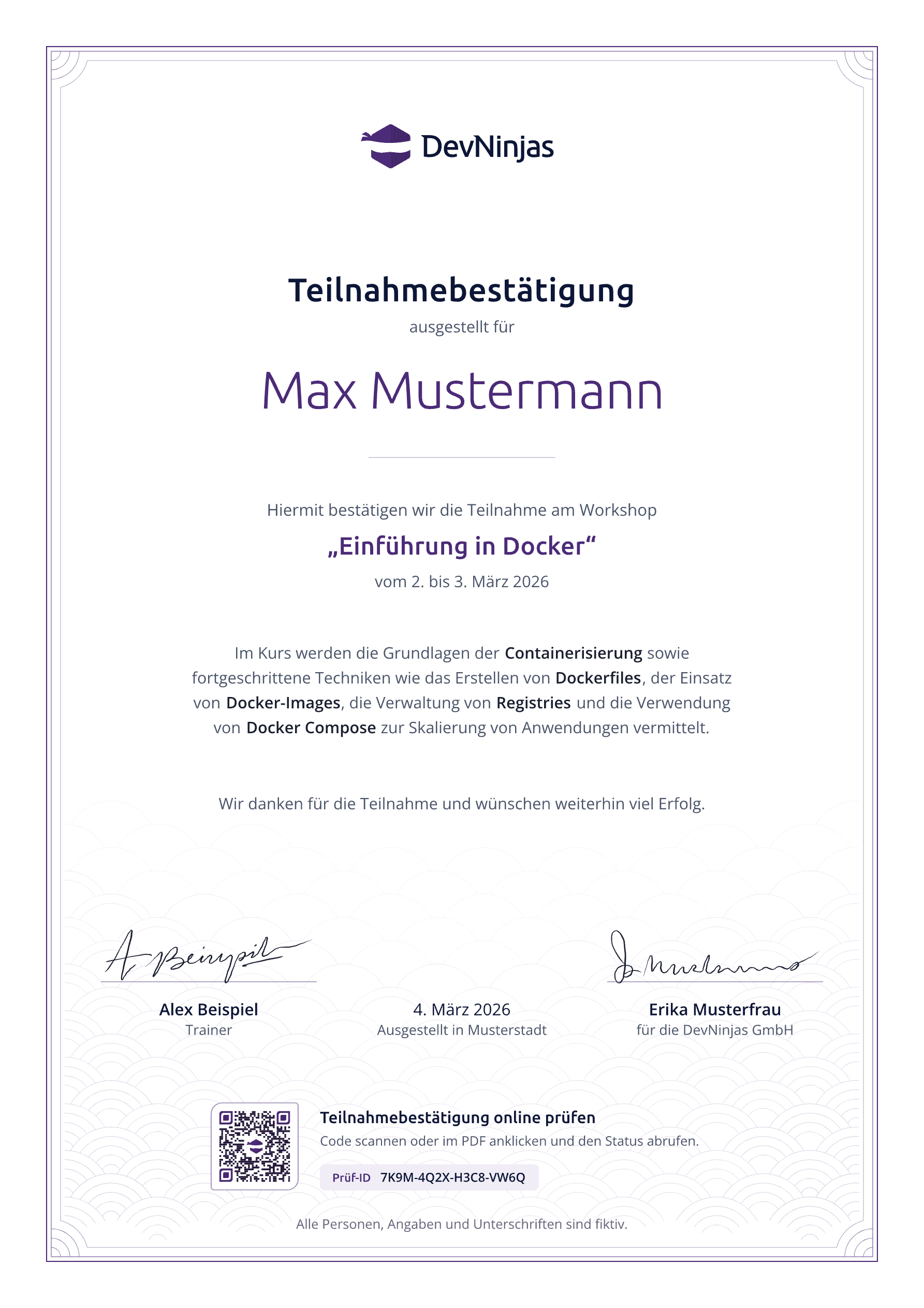
Look up the register entry for your certificate of attendance. The verification ID is next to the QR code at the bottom.
No account · no PDF upload · public register details only
Where can I find the verification ID?

What does the verification result tell me?
The register shows the current status for the verification ID. Check the workshop, course dates and issuer against your certificate.
Register entry status
- Confirmed in the register
- The entry is current.
- Superseded
- The link in the entry takes you to the newer version.
- Revoked
- DevNinjas has withdrawn the certificate.
The status is current at the time of the lookup.
What does the register confirm?
- Public
- Issuer, workshop, course dates, issue date, verification ID and status.
- Private
- Name and personal PDF certificate.
- Not checked
- The person's identity, changes to the PDF and whether the person passed an exam.
If no status appears
- No record found
- Check the verification ID against the PDF or scan the QR code. A missing entry does not prove forgery.
- Technical issue
- The status is temporarily unavailable. Try again later.
Verification FAQs
Does a missing register entry prove forgery?
“No record found” leaves the question of forgery unresolved. If you typed the verification ID, scan the QR code on the certificate of attendance to rule out a typing error.
If you see the same message after scanning the QR code, ask the participant to double-check the verification ID on their certificate. If the question remains unresolved, send us the printed verification ID and the message via the contact form.
What should I check if the form rejects the verification ID?
If the form rejects the verification ID, check all 16 characters you entered against the verification ID next to the QR code.
- The ID is printed on the certificate in four groups of four characters.
- Hyphens, spaces and letter case make no difference when you enter it.
- The form reads the letter O as 0 and the letters I and L as 1.
The message next to the field concerns the format of the verification ID. To look up the entry without typing, scan the QR code.
What if the PDF and the register entry do not match?
First, check whether the PDF and register entry refer to the same version.
- Compare the verification IDs. If they differ, look up the register entry for the verification ID printed on the PDF.
- If you see “Superseded”, follow the link to the newer register entry and ask for the corresponding PDF. The newer version has its own verification ID.
- When the verification IDs match, check any visible details for the workshop, course dates and issue date against the PDF. If a detail still differs, send us the verification ID and the detail in question via the contact form.
The comparison covers only the details you check.
How do I match a register entry to a person?
To find the name associated with a register entry, you need the PDF certificate of attendance. If you only have the verification link, ask the participant for their certificate.
Read the name on the PDF and compare the verification ID, workshop and course dates with the public register details if they are visible. If those details agree, you can match the PDF to the register entry. If you need to verify the person’s identity, check it separately.
Is the verification link enough for my employer?
If your employer needs proof of attendance with your name on it, send them the PDF certificate of attendance. They can use the public verification link to look up the register entry for the verification ID.
You’ll find the verification link in the QR code on the certificate and on your personal pickup page. Keep the personal pickup link from your email private.
What if the pickup email is missing or the link expired?
Contact DevNinjas if you’ve checked your spam folder and still can’t find your pickup email, or if your pickup link has expired.
Tell us which workshop you attended and whether the email is missing or the link has expired. You need a valid personal pickup link to download the PDF.